September Adhese Release Notes
If you work with managed campaigns, Adhese now gives your team more time and more control. You land on a homepage with your whole portfolio, the booking flow only shows what applies to your booking type, and new permissions let you choose who manages your targets.
Your entire omnichannel portfolio, in one view.
-
Start from an overview, not a list
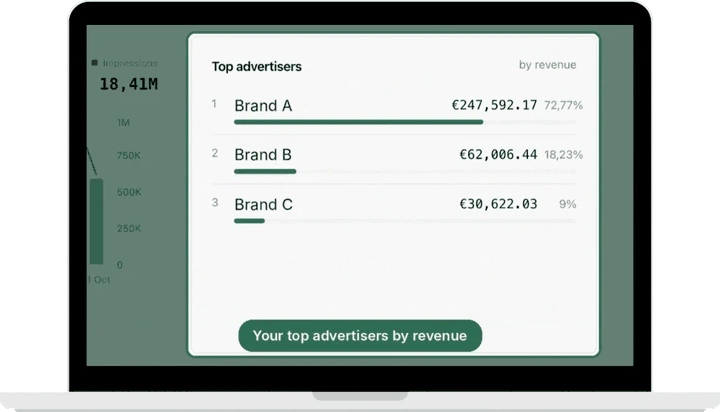
As a managed user, you now land on a homepage that shows how all your campaigns performed over the last 30 days. Revenue, impressions, clicks, eCPM and the share of bookings on pace are right at the top, each compared with the previous period, with a daily chart and your top advertisers by revenue just below.
Good to know: revenue always uses the price that applied when an impression or click was delivered, so changing a CPM or CPC later doesn’t rewrite past revenue. “Metrics explained” shows how every number is calculated.
-
Pick up where you left off, and see what’s next
Your homepage also lists the bookings you viewed most recently and the ones about to start, so getting ready for the next go-live no longer begins with a search.
A new booking flow, shaped by your booking type
-
A booking flow that adapts to what you book
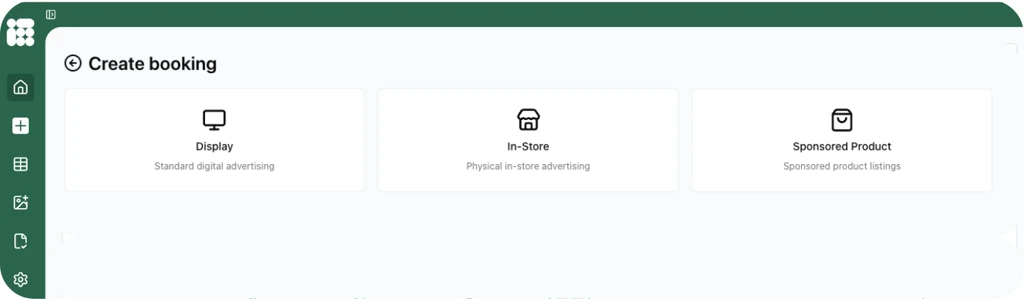
Booking a managed campaign now starts with choosing the booking type, and from there each step only shows what applies to it: the eligible channels, positions and targets, and the delivery objectives, priority and limits that fit. Your default priority is filled in automatically, Sponsored Product bookings get a product feed step, and every booking ends with a summary before you confirm.
Your overviews now tell you more
-
More detail per campaign, booking and creative
In the campaign and booking overviews, you can now filter by booking type and open reporting directly from the table. Delivery rate and inventory share show for each campaign as well as for each booking, and incomplete campaigns tell you what is missing.
For creatives, you can approve one from its detail screen, see which creatives belong to a booking, and check how many a booking already has before linking another.
Good to know: on In-Store bookings, impressions are now shown as “Proof of Play”.
You decide who manages what
-
Targets and roles, managed by you
Admins get a new Targets page in the admin area to browse and filter target categories and create new standard or custom ones. New permissions let you give someone rights to manage targets without also giving them campaign or booking rights, and a new managed viewer role gives read-only users access to managed campaigns.
Good to know: the Targets page only appears for users with rights to create or update targets.
You can start your 2027 rate card now
-
Next year’s pricing, without touching this year’s
You can now prepare next year’s rate card without overwriting the one currently in use. Seasonality is applied pro rata across the booking period, so a booking that spans two seasons is priced for both.
Action required if you upload rate cards via CSV: CSV upload has been removed. Rate cards are now managed entirely in the Campaign Manager.
For more information or how to, please Contact Support.
adhese additional news:

New partnerships

Adobe Experience Platform × Adhese
Using Adobe Experience Platform? Audiences you build there, such as loyalty members or regular buyers of a product category, can now be sent directly to your Adhese account and used to target campaigns on your own inventory. That means no manual file transfers, more targeted campaigns to sell to your advertisers, and your data stays yours: only IDs are shared (such as Adobe IDs or hashed email addresses), in a folder only your account can access.
For more information or how to, please Contact Support.
Awards:

View here
Working on something for 2027? We’d be happy to explore putting it in the spotlight with you, through an award entry, a case study or a joint talk at an event. Contact marketing@adhese.eu